
New: the Help Desk edition
A WordPress helpdesk plugin where chat, email and tickets share one inbox
Help Desk is the upper edition of Sales Igniter Chat. It adds tickets with numbers, teams and SLA timers, a ticket form and a My support tickets page for your customers, AI drafts from your own docs, and Secure details for the logins your clients give you. It all runs inside WordPress.
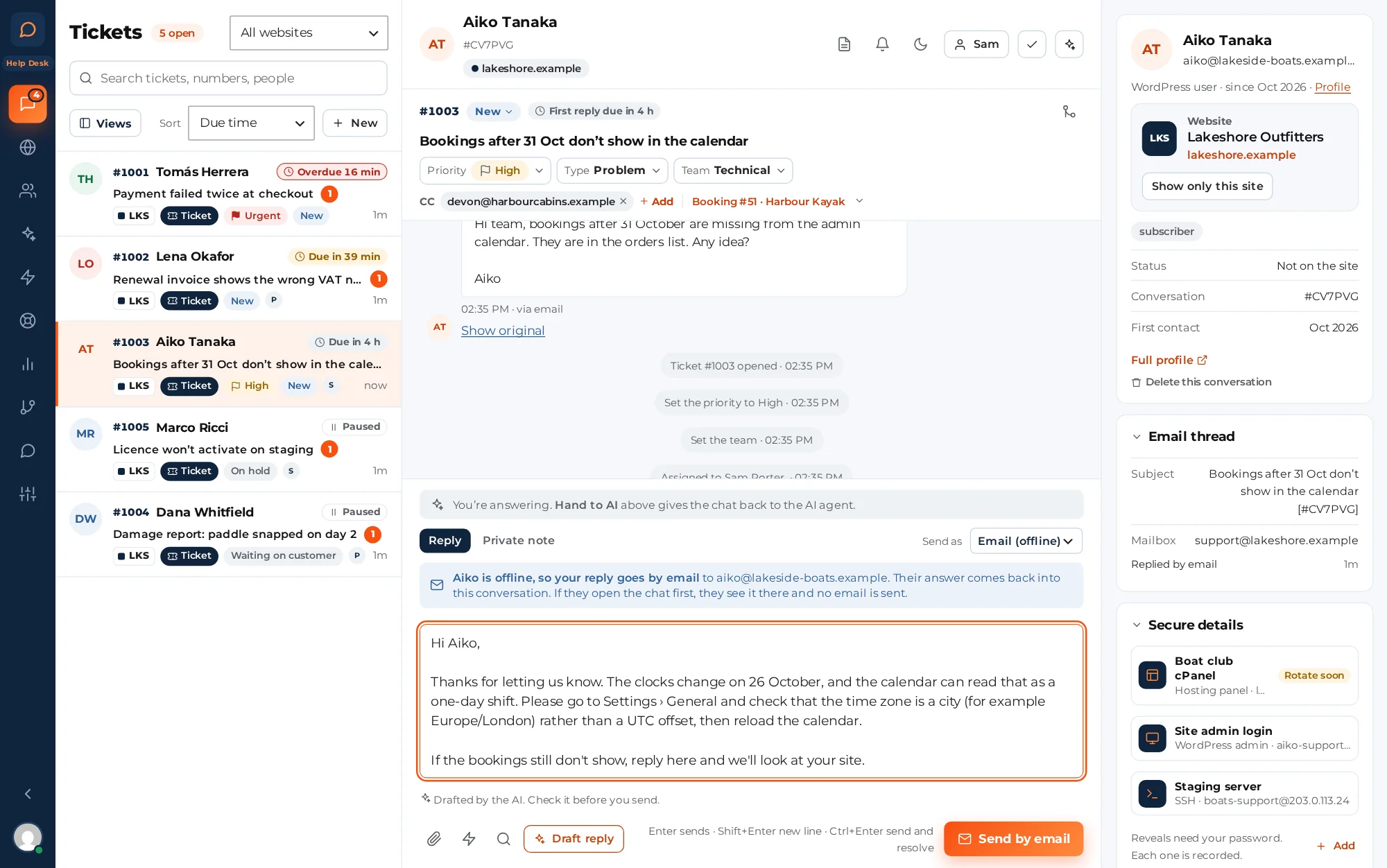
- One inboxfor chat, email and tickets
- Every agentincluded, no per-seat fees
- Your databasetickets stay on your own server
- $50 upgradefrom Live Chat, same licence key
Live Chat or Help Desk
What Help Desk adds to Live Chat
One plugin, two editions. Help Desk has everything in Live Chat, plus the tools for support that takes more than one chat: tickets, a portal for your customers and a safe place for their logins.
Nothing moves out of Live Chat. Email in the inbox, saved replies, routing, office hours, ratings, the purchases panel, several websites and the AI chatbot all stay in it.
| Feature | Live Chat$99 the first year | Help Desk$149 the first year |
|---|---|---|
| Chat widget, shared inbox and live visitors | Included | Included |
| AI chatbot that answers from your own pages | Included | Included |
| Email replies in the inbox (IMAP, pipe or webhook) | Included | Included |
| Saved replies, routing, office hours and notes | Included | Included |
| Purchases beside the chat (WooCommerce, Easy Digital Downloads) | Included | Included |
| Several websites in one inbox | Included | Included |
| Tickets with numbers, statuses, priority and types | Not included | Included |
| New email becomes a ticket, with CC | Not included | Included |
| Ticket form and My support tickets page | Not included | Included |
| Make a chat a ticket | Not included | Included |
| Teams, and SLA timers on your office hours | Not included | Included |
| Macros, merge, auto-close and ratings by email | Not included | Included |
| AI drafts on tickets | Not included | Included |
| Reports with CSV export | Not included | Included |
| Secure details: client logins, encrypted | Not included | Included |
| Import from SupportCandy | Not included | Included |
Tickets
A WordPress ticket system in the inbox you already use
Chats, emails and tickets sit in one list, so nobody has to check two tools. Tickets get the extra things support needs.
- Numbers and statuses. Each ticket gets a number from 1001, like RBS-1042 (the letters are your site’s badge letters; without them it is plain #1042), a status (New, Open, On hold, Waiting on customer, Solved, Closed), a priority and a type.
- Every way in. Email to your support address, the ticket form, "Leave a request" in the chat widget, or one click on a chat: Make it a ticket.
- Teams and SLA timers. Each team has its own queue and a default mailbox for replies. Timers count your office hours and holidays, pause while a ticket is on hold or waiting on the customer, and warn you before a ticket is overdue.
- CC that works. People copied on an email stay on the ticket and get your replies.
- Macros, merge and auto-close. A macro sends a saved reply and sets the status, priority, type, team and assignee in one go. Merge duplicates. Tickets waiting on a customer get a reminder after 3 days and are solved after 7; solved tickets close after 4 more.
AI drafts and reports
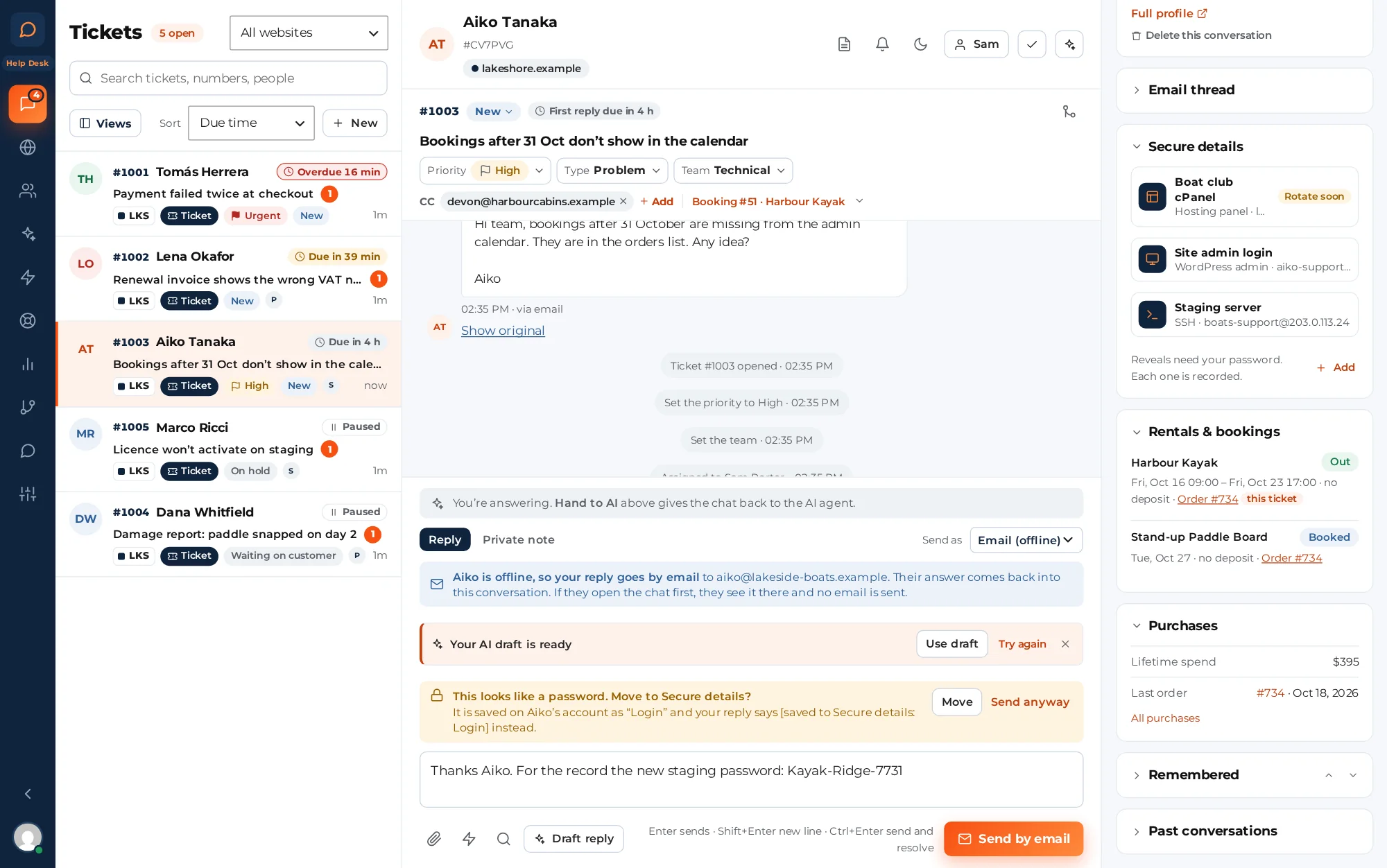
A draft is waiting when you open the ticket
- Draft reply. The AI writes a draft from your docs and the customer’s orders, rentals and bookings, with its sources. Nothing is sent until an agent uses it.
- Ready when you open it. New tickets can have a draft waiting, inside your monthly AI budget.
- AI replies only if you want them. Off by default. Switch them on for the rules you choose. Each reply ends "This reply is from our AI assistant. Reply to this email to reach a person."
- Reports. Created, solved and backlog, first response and resolution in business hours, SLA met and ratings, by channel, team, agent, type and website, with what the AI cost. Export to CSV.
- Ratings. The "solved" email has one-click Good and Not good.
For your customers
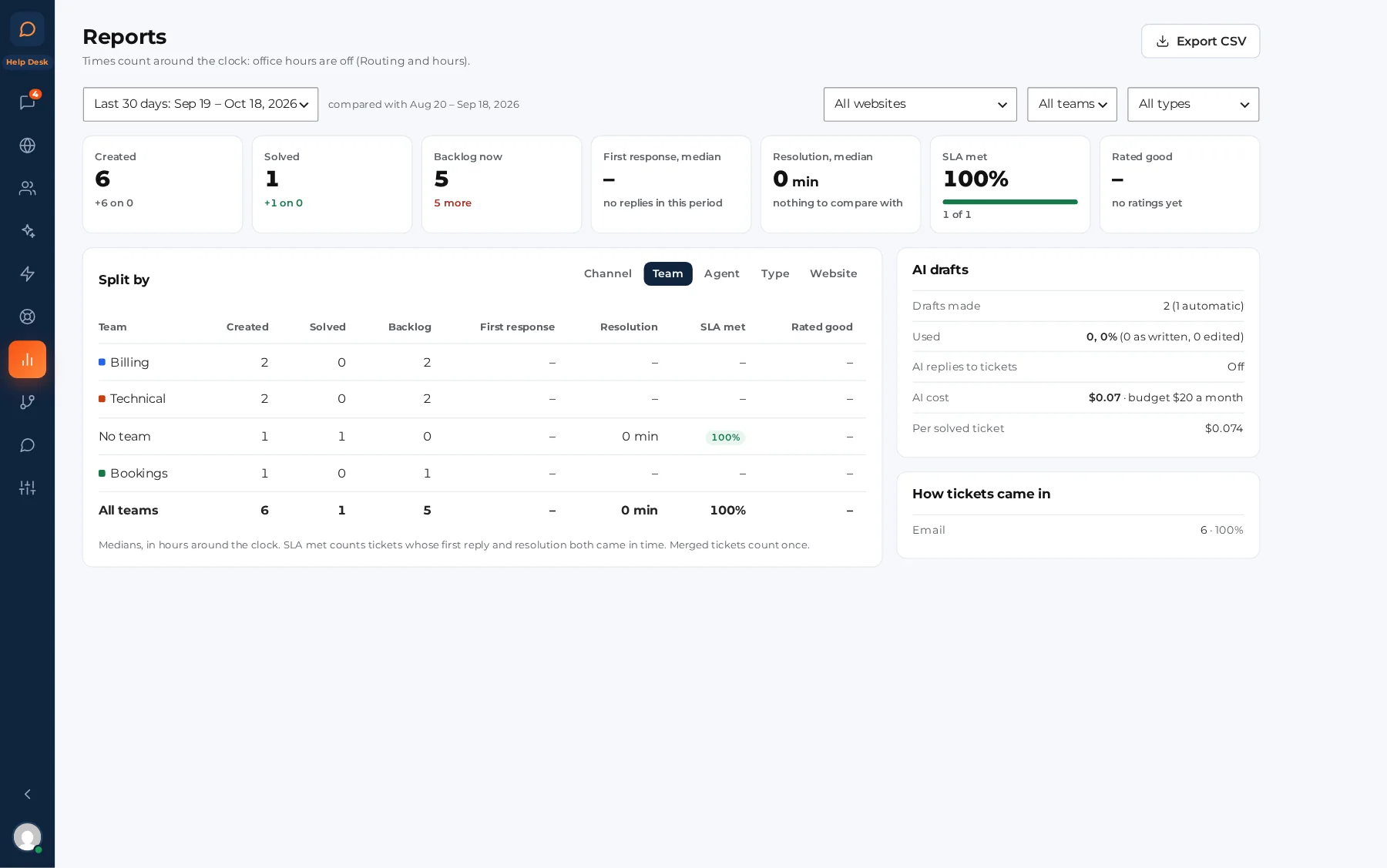
A ticket form and a My support tickets page on your own site
Customers ask for help where they already log in, and follow their requests without hunting through email.
Ticket form
A block or shortcode: name, email, subject, message, type, files and up to 8 fields of your own. Logged-in customers pick the order it’s about. Spam checks are built in.
My support tickets
Customers see their tickets, read your replies, answer with files, mark a ticket solved and rate it. Guests sign in with a code we email them.
WooCommerce and EDD
A Support tickets tab in WooCommerce My Account (Secure details sits beside Tickets inside it). On Easy Digital Downloads sites, add the My support tickets block to your account page.
Emails that say what’s next
Request received, with the number and when you usually reply; your replies; a reminder when you’re waiting on them; and the solved email with a rating.
Back to the ticket
"View your request" in ticket emails opens the customer’s My support tickets page. Without that page, it opens the request in the chat widget on your website (that link works for 7 days).
Secure details
Your clients’ logins, kept out of tickets and email
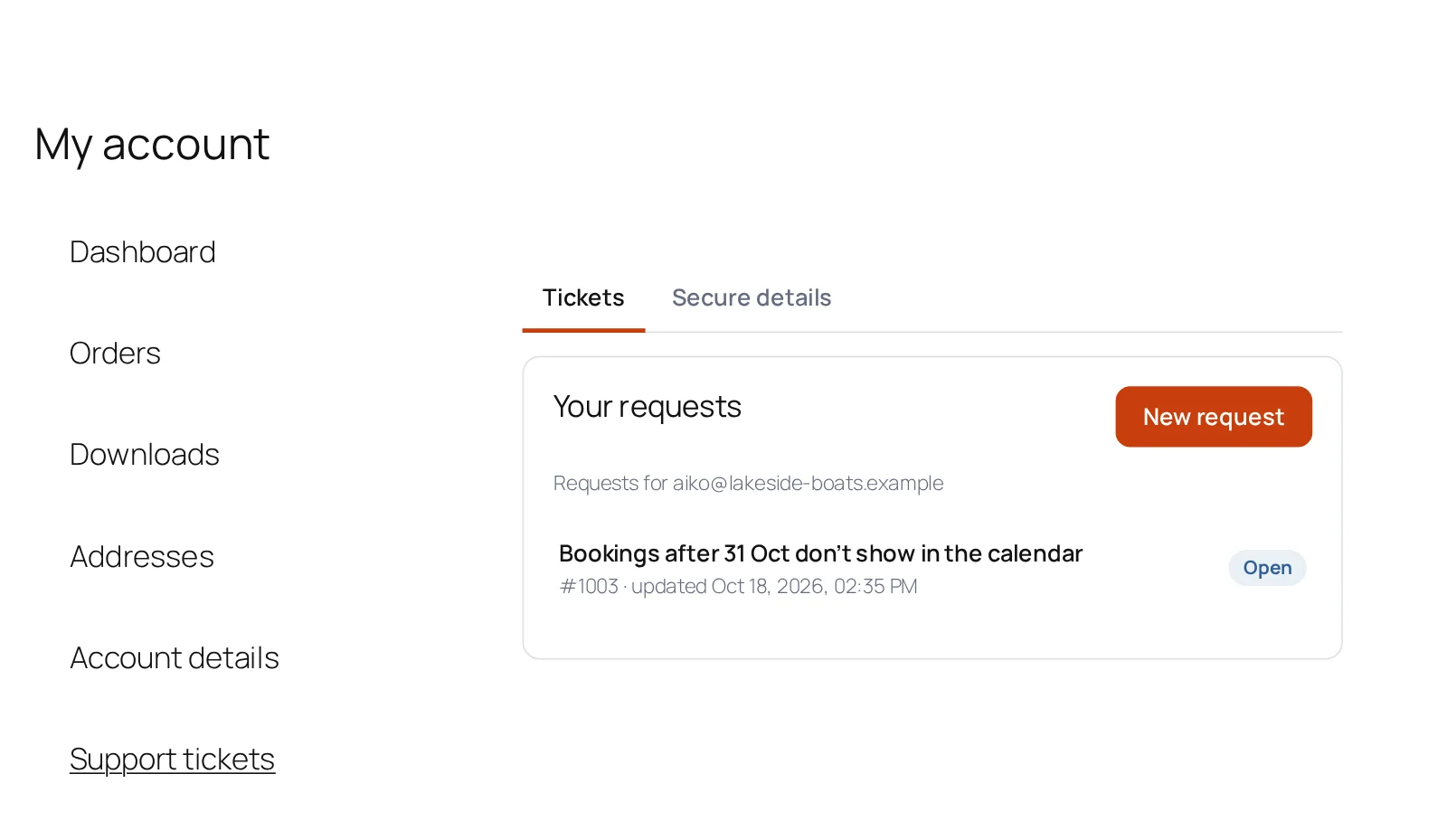
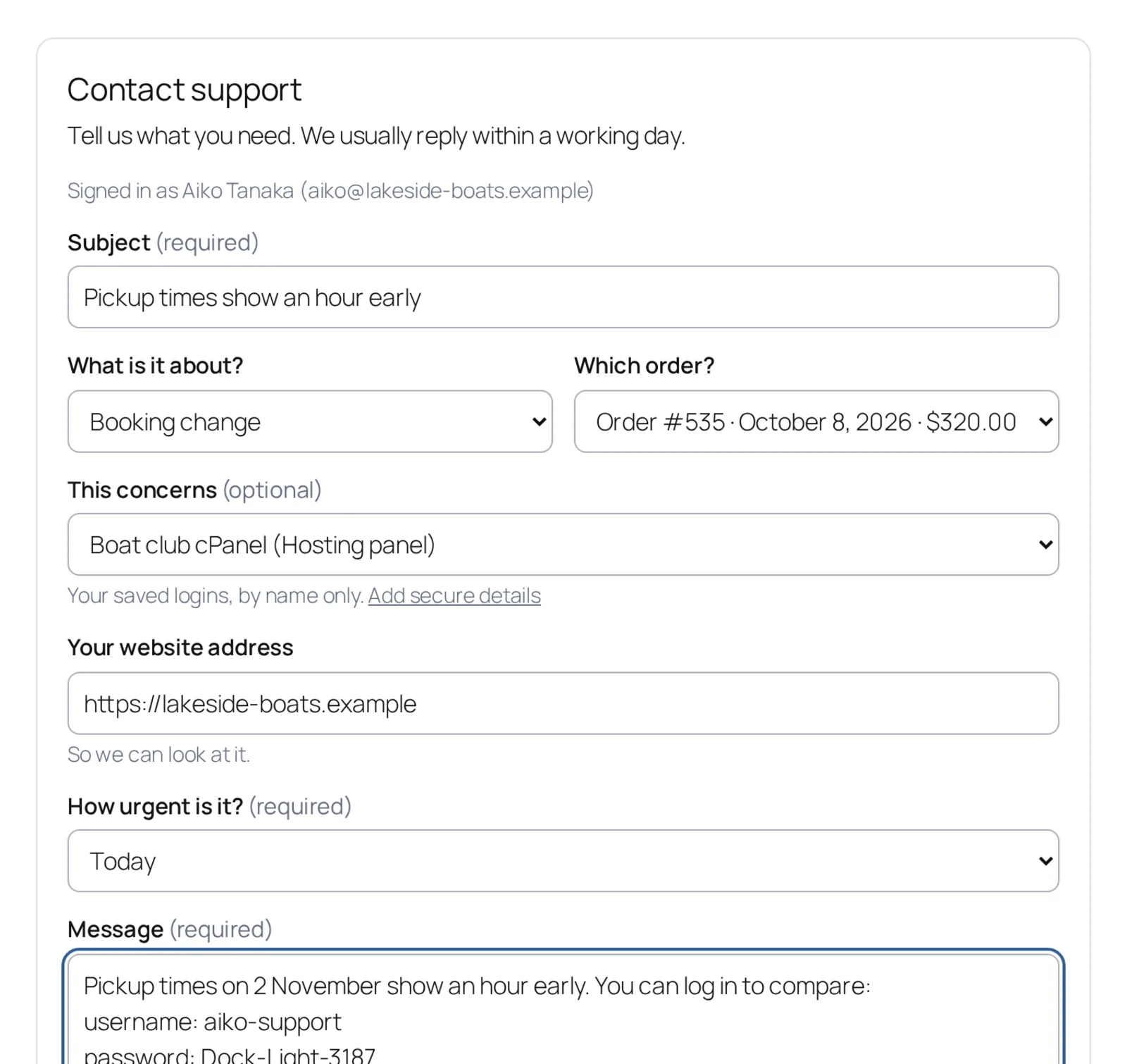
Agencies, hosting teams and WordPress care plans need their clients’ logins: SSH, SFTP, a hosting panel, a WordPress admin, a database, an API key. Secure details keeps each one on the client’s account, encrypted, and shows it only to the people you choose, when they need it.
It’s off until an administrator switches it on and confirms the vault key is backed up.
On the client’s account, not in a ticket
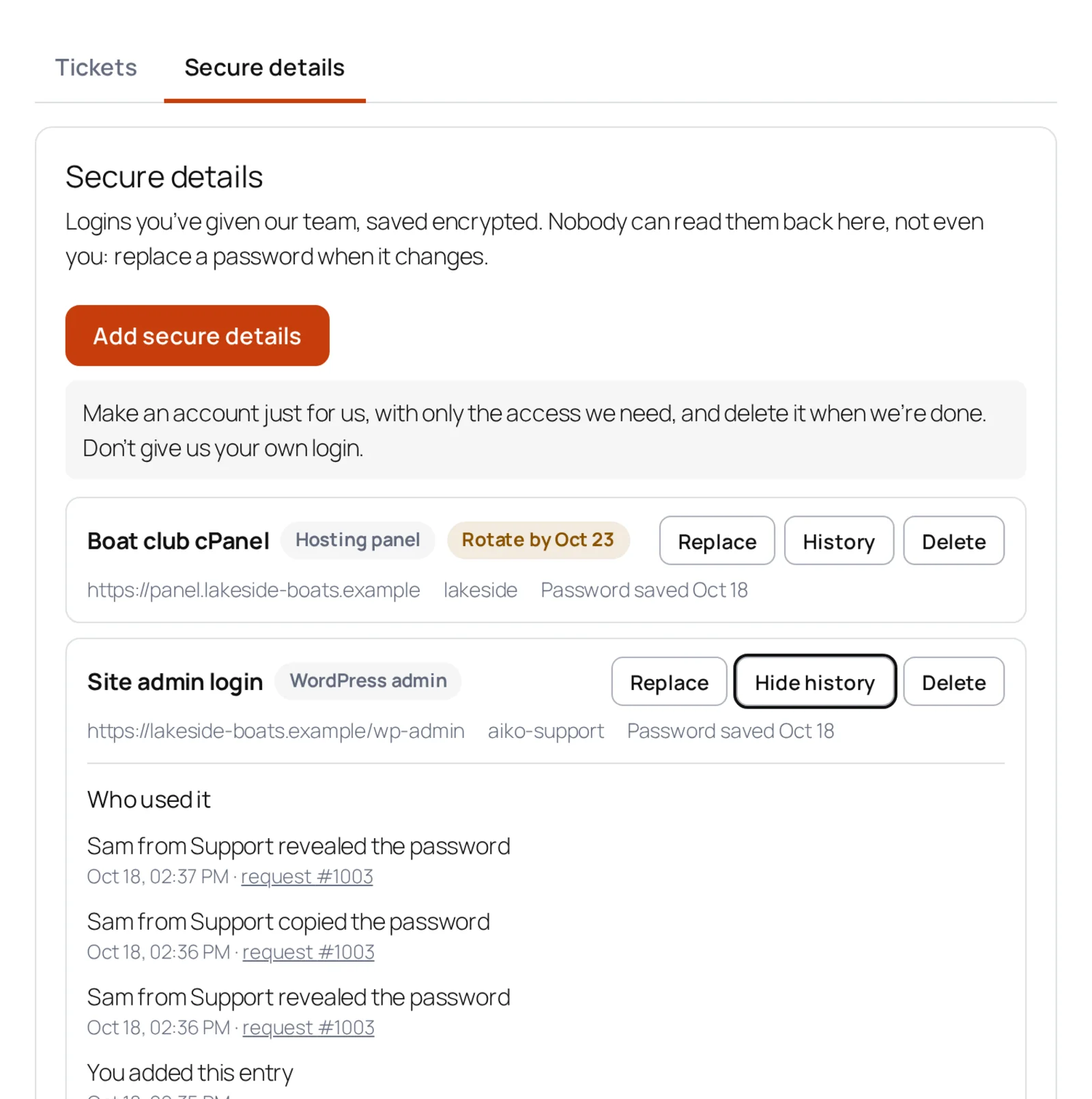
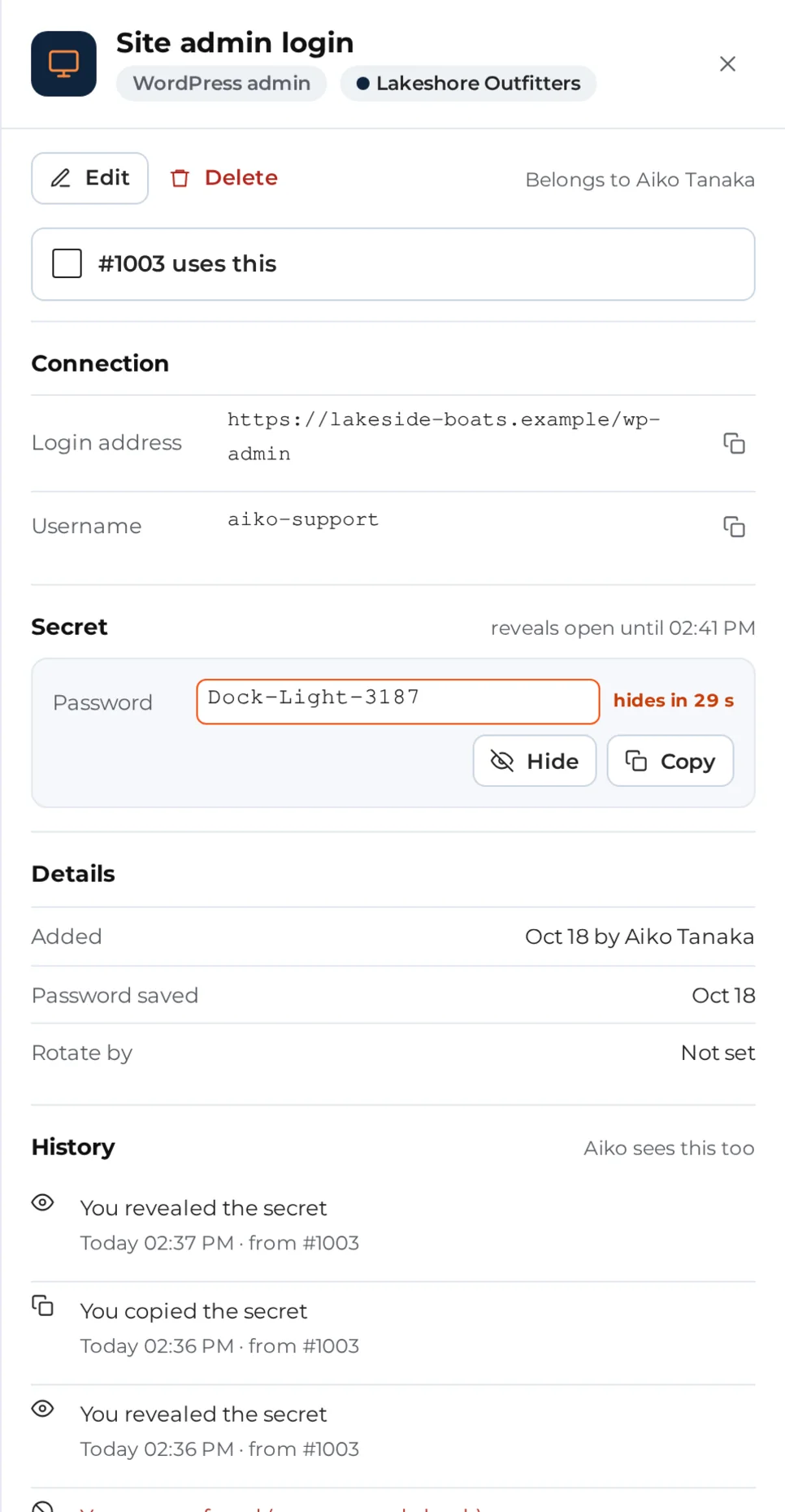
Clients add, replace and delete their own entries, and can set a date to change a password, with a reminder. A ticket only says which entry it uses.
Encrypted, with the key kept out of the database
Each entry has its own key, locked with a vault key kept in wp-config.php or a key file. A copy of the database alone can’t be read.
Shown only when needed
Only administrators can see them at first; you give "view" to named people. Revealing asks for their WordPress password again (at most every 5 minutes), each person gets 30 reveals an hour, and a revealed password hides again after 30 seconds.
Every view is on record
Each reveal, copy and change is logged with who, when and from which ticket. Clients see that history for their own entries.
It never travels
No email, notification, macro, AI draft, report or export can carry a saved login, and nothing from Secure details goes to an AI provider.
Passwords in messages get caught
The reply box, the chat widget and the ticket form spot a likely password and offer to move it to Secure details. Email that arrives with one is flagged for you.
What it protects, plainly
Secure details protects your clients’ logins from a leaked database or backup, a stolen login session, and staff you haven’t given access. Someone with full control of your server can install code and read the key, so turn on two-factor sign-in for everyone you give access.
Back up your vault key. We can’t recover lost keys: without it nobody can read the saved details, including us. Your clients can enter them again.
Importer
Switch from SupportCandy
Bring your tickets with you. The importer reads SupportCandy’s tables directly, so it works whether SupportCandy is still active or already deactivated.
- 1
Find your tickets
Help Desk, Tools, Import tickets lists SupportCandy when it finds it on your site.
- 2
Dry run
See how many tickets, messages, files and customers it found, and anything it can’t map, before anything is written.
- 3
Check the mapping
Statuses, priorities and agents come with defaults filled in; agents and customers are matched by email.
- 4
Import in the background
Watch the progress. It picks up where it stopped after an interruption, and gives you a log at the end.
A ticket keeps its number when it is free here; otherwise it gets the next free one and the old number stays searchable. Attachments go to the plugin’s private file store, and running it again skips tickets already imported. For SupportCandy 3.x: the screen tells you before anything runs if your version is older.
Pricing
Help Desk pricing: per site, never per agent
Every agent is included. The AI is billed by your own provider, at their price: work out your AI cost.
Help Desk, 1 site
$149 the first year
Then $89 a year for support and updates, renewing automatically; cancel at any time. Everything in Live Chat, plus tickets, the customer portal, Secure details and the SupportCandy importer.
Help Desk, 10 sites
$399 the first year
Then $199 a year. For agencies and businesses with several sites: their tickets in one inbox.
Already on Live Chat?
Upgrade for the difference: $50 for 1 site, $100 for 10 sites. Same licence key, same renewal date.
Included in the Ultimate package for WooCommerce.
Docs
Read the Help Desk docs
Nine guides with screenshots of the released plugin, from setting it up to reports. All the docs
- Help Desk, getting startedThe two editions, what changes when Help Desk switches on, and the five setup steps.
- Working with ticketsViews, numbers, statuses, priorities and types, Make it a ticket, macros, merge and auto-close.
- Teams and SLA policiesWho answers what, how new tickets are handed out, and the reply and resolution targets.
- The ticket form and My support ticketsThe request form and its fields, and the page where customers follow their requests.
- Tickets by emailNew emails become tickets, people on CC stay on them, and the emails your customers get.
- Secure detailsCustomers’ logins, encrypted: switching it on, the key backup, who may view, and every reveal on record.
- Import tickets from SupportCandySupportCandy 3.x tickets with their replies, notes, files and customers, in a dry run first.
- AI for tickets, orders and rentalsAI drafts and summaries, AI replies only if you want them, and the customer’s orders and rentals beside each ticket.
- Help Desk reportsCreated and solved, reply and resolution times, SLA met and ratings, by channel, team, agent, type or website.
Questions about the WordPress help desk
Is Help Desk a separate plugin?
No. Help Desk is the upper edition of Sales Igniter Chat: the same plugin, the same download and the same licence key. Your licence decides which edition you have.
I already have Live Chat. What does the upgrade cost?
The difference: US$50 for 1 site and US$100 for 10 sites. You keep your licence key and your renewal date; the renewal becomes US$89 or US$199 a year. An expired licence is renewed first, then upgraded.
How much is Help Desk?
US$149 for one site for the first year, then US$89 a year; US$399 for 10 sites, then US$199 a year. Every agent is included. The AI is billed separately by your own AI provider.
Do I pay per agent?
No. Every agent is included, in both editions.
What happens to my chats and emails when I upgrade?
They keep working as they do now. New email to a ticket mailbox becomes a ticket, and one click can turn your open email conversations into tickets.
Can customers open a ticket without an account?
Yes. The ticket form asks for a name and an email. To see their tickets later, guests sign in on the My support tickets page with a code we email them.
Does it work with WooCommerce and Easy Digital Downloads?
Yes. WooCommerce My Account gets a Support tickets tab, with Secure details beside Tickets inside it. On Easy Digital Downloads sites, put the My support tickets block on your account page. Orders sit beside each ticket.
Where are tickets and Secure details stored?
In your WordPress database, in the plugin’s own tables. Ticket files go to the plugin’s private file store, never the media library. Secure details are encrypted, with the key kept outside the database.
If we lose the vault key, can you recover the saved logins?
No. Back up your vault key: we can’t recover lost keys. Without it nobody can read the saved details, including us. Your clients can enter them again.
Does the AI see tickets or Secure details?
The AI drafts replies from your docs and the customer’s orders and bookings, and nothing is sent until an agent uses a draft. It never sees Secure details, not even their names, and passwords spotted in messages are hidden before any AI call.
Which email providers work?
Any mailbox the plugin can read by IMAP (Gmail works with an app password), or any provider that can forward your support address to the plugin’s pipe or webhook address.
Can I move from SupportCandy?
Yes, from SupportCandy 3.x: tickets, messages, private notes, attachments and customers. A ticket keeps its old number when it is free, and the old number stays searchable. See Switch from SupportCandy.
What if my licence expires?
Help Desk keeps working, with every feature on. An expired licence never locks anything; renewing brings updates and support.
Chat, email and tickets in one WordPress inbox
Help Desk adds tickets, a customer portal and Secure details to Sales Igniter Chat. It runs inside WordPress, and your tickets stay in your own database.