
Sales Igniter Chat: tickets by email
With Help Desk on, an email to your support address can become a ticket, and every ticket can be answered by email. Mailboxes are set up in Settings › Email › Mailboxes, the same place as for email conversations (see “Setup”, section 5, for IMAP, pipe and webhook).
New emails become tickets
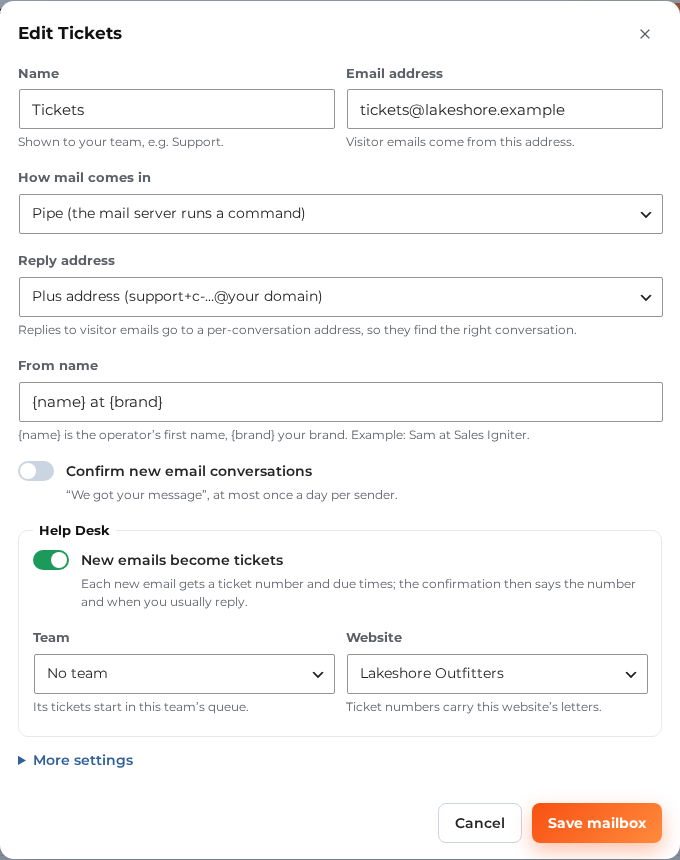
Each mailbox has a Help Desk box:
- New emails become tickets: each new email gets a ticket number and due times. The confirmation email then says the number and when you usually reply. On by default for mailboxes you add while Help Desk is on. Mailboxes you had before keep working as email conversations until you tick it.
- Team: the team whose queue the new tickets start in.
- Website (when you have several sites): ticket numbers carry this website’s letters.
The mailbox list shows a Tickets label (with the team) on every mailbox that makes tickets.
A reply to an existing ticket never makes a new one: the reply address carries the ticket, so the email joins its thread. A reply to a closed ticket starts a follow-up ticket that links back.
CC
- People in the Cc of a customer’s email are added to the ticket (never your own mailbox addresses).
- Add or remove CC people in the ticket bar.
- CC people get every public reply from your team by email, and their emails join the ticket. Internal notes never go to them, and neither do the customer emails below.
The emails your customers get (Help Desk › Tickets › Emails to customers)
| When | Can be switched off | |
|---|---|---|
| Request received | A new ticket from the form, an email or the chat. It has the number and when you usually reply. | The mailbox’s “Confirm new email conversations” covers email tickets |
| Waiting on you | The ticket has waited on the customer for 3 days (Auto-close) | Set the reminder to 0 days |
| Solved, with a one-click rating | You mark the ticket solved | “Email the customer when a ticket is solved” |
| Follow-up created | Their reply to a closed ticket opened a follow-up | “Email the customer when their reply to a closed ticket opens a follow-up” |
These go to the ticket’s customer only, never to CC people. They go out through the ticket’s thread, so a reply comes back to the ticket. Nobody gets them after they used the “stop emailing me about this” link, and no email has a tracking pixel.
Your replies
- A public reply goes to the customer and the CC people from the mailbox the ticket came in on, or else from the team’s default mailbox.
- The From name follows the mailbox’s From name (for example “Sam at Sales Igniter”).
- Files you attach go with the email.
- The View your request button opens the ticket in the customer’s My support tickets, like the emails above. Without a My support tickets page it opens the request in the chat on your website instead (that link works for 7 days).
- An email reply from the customer lands in the same ticket, in the inbox, within a minute for IMAP and at once for pipe and webhook mailboxes.
A login in an email
When an email holds something that looks like a password or a key, the message is flagged in the inbox. People who may edit Secure details can move it there and remove it from the message in one step. See Secure details.