
Sales Igniter Chat: privacy, consent and GDPR
Sales Igniter Chat keeps everything on your own server, asks for consent before it tracks anyone, and gives you the tools to answer a person’s request for their data. Chatting never needs consent: a visitor who says no to tracking can still chat. The settings are under Live chat › Settings › Privacy.
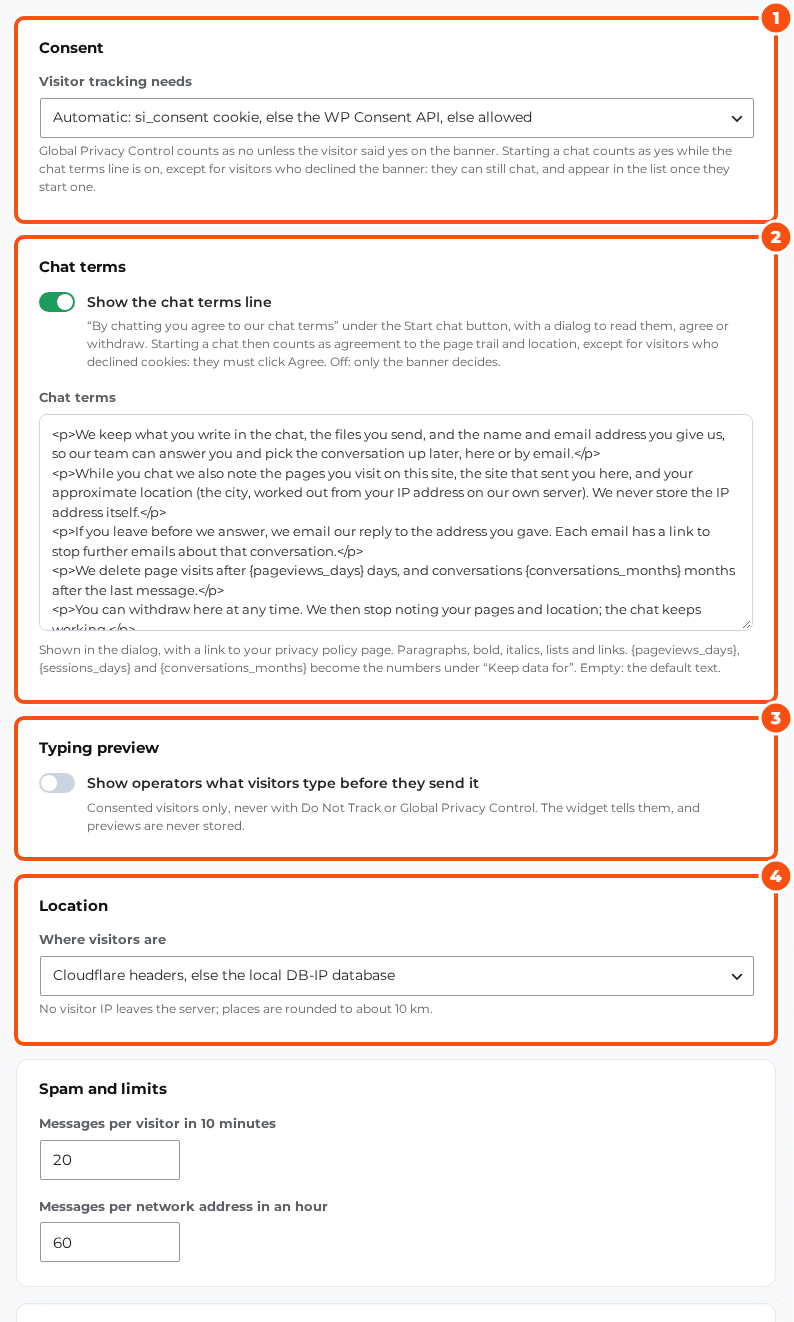
What needs consent
Tracking means the Live visitors screen, the pages a visitor viewed and the map. It runs only with consent. Visitor tracking needs:
| Choice | Where the yes or no comes from |
|---|---|
| Automatic (default) | The si_consent cookie, else the WP Consent API, else allowed |
| The si_consent cookie | The cookie; without a choice, implied outside the EU/EEA, the UK and Switzerland |
| The WP Consent API | A consent plugin that supports the WP Consent API |
| Always allowed | Only where no consent banner is needed |
| Never track visitors | No tracking, whatever the visitor does |
Global Privacy Control counts as a no in every mode, unless the visitor said yes on your banner or agreed to the chat terms.
The chat terms
With Show the chat terms line on (the default), the widget shows “By chatting you agree to our chat terms” under the Start chat button. The link opens your Chat terms text, a link to your privacy policy page (set it under WordPress’s Settings › Privacy) and Agree / Close. After agreeing the visitor sees the date, with Withdraw.
- Starting a chat under the line counts as agreeing, except for a visitor who declined your cookie banner: they can still chat, and are not tracked.
- Withdraw stops tracking at once, until the visitor agrees again.
- The chat terms text takes paragraphs, bold, italics, lists and links;
{pageviews_days},{sessions_days}and{conversations_months}become your retention numbers.
The typing preview (operators see what a visitor types before they send it) is off by default. It needs an explicit yes (the banner’s, or Agree), and Do Not Track or Global Privacy Control always turn it off. With the WebSocket the text goes to the socket server only. With polling the newest preview of a chat is kept for up to 15 seconds for the team’s next poll, then expires; sending the message, emptying the box or resolving the chat removes it, and it is never saved with the chat or in the event log.
Google Analytics chat events
With Send chat events to Google Analytics on (Settings › Privacy › Analytics, on by default), the chat tells your site’s own Google tag (gtag) about two moments, each once per conversation: chat_started when a visitor sends their first message (with chat_source: launcher, proactive or operator) and chat_lead when they give their email in the chat. No message text, email or name is sent, and nothing is sent for your team. It only does anything when your site already loads gtag, so a cookie banner that holds gtag back until the visitor accepts also holds these events back. Showing a proactive message is not a chat start. Mark the events as key events in Google Analytics to use them in Google Ads.
Cookies
| Name | What for | Lasts |
|---|---|---|
silc_vid | Recognises the browser’s chats; the server keeps only a hash of it. Set when a chat starts | 12 months |
silc_terms | The visitor’s answer to the chat terms (chat started, agreed or withdrawn) and the time | 12 months |
The widget also keeps a few values in the browser’s session storage (unread count, proactive-message caps for this visit, and silc_fast_off when the fast lane did not answer in this tab, so the chat uses the REST API) and, only with consent, in local storage (when a proactive message may show again, the visit count). Your cookie banner’s si_consent cookie is never changed by the chat.
What is kept, and for how long
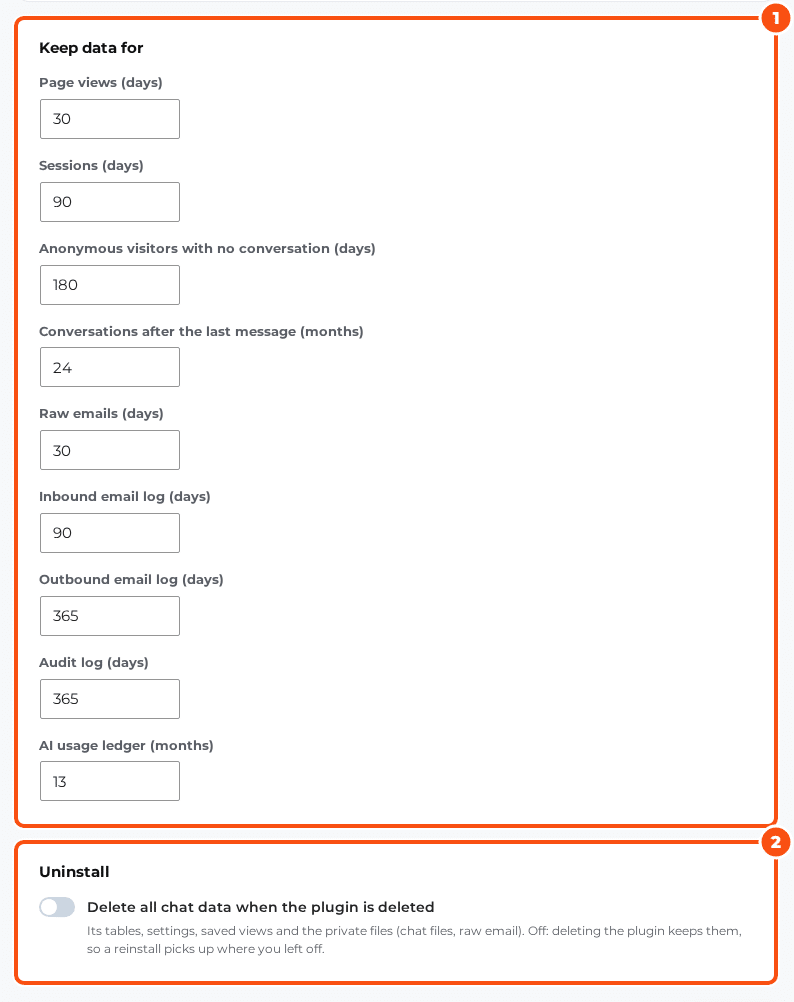
| Data | Kept (default) |
|---|---|
| Page views | 30 days |
| Visits (sessions) | 90 days |
| Anonymous visitors with no conversation | 180 days |
| Conversations, with their messages, files and email | 24 months after the last message |
| Raw emails | 30 days |
| Inbound email log | 90 days |
| Outbound email log | 1 year |
| Audit log | 1 year |
| AI usage ledger | 13 months |
A daily job deletes what is older. IP addresses are never stored (a salted hash is used for spam limits), locations come from Cloudflare’s headers or a local DB-IP file and never from an outside service, and coordinates are rounded.
Delete all chat data when the plugin is deleted (off by default) removes the tables, settings and chat files when you delete the plugin. Capabilities, the Chat operator role and the scheduled jobs always go.
A person’s rights
- WordPress tools: Tools › Export Personal Data and Tools › Erase Personal Data include “Live chat”, matched by email address.
- On the person’s profile: the More menu has Export data (a JSON file) and Delete person, for users with the
silc_export_contactscapability (administrators). - An export holds the person’s details, the facts your team noted, their devices, visits and pages, every conversation’s public messages and file names, and the email log. Private notes stay out.
- Deleting removes the person and anyone merged into them, their conversations, messages and files, their email, devices, visits and facts.
- Both are written to the audit log (Settings › Audit log), with ids and counts only, never the person’s details. Revealed licence keys, merges, blocks and rule changes are logged there too, and so are the records the chat joins by itself (
contact.merge.auto, with the reason).
Your privacy policy
WordPress’s Settings › Privacy › Policy Guide gets a “Sales Igniter Live Chat & AI Chatbot” section with suggested text: what the chat keeps, the two cookies, tracking only with consent, email replies with a stop link, the AI provider as a processor, and your retention numbers. Copy it into your privacy policy and edit it to match your setup.
The AI and your data
When the AI answers, the conversation goes to your AI provider (OpenRouter and the model’s host, by default). Every request asks the provider not to collect it, Zero-data-retention hosts only is on by default, and Hide emails and phone numbers from the model replaces email addresses, phone numbers and card-like numbers before they leave your site. See The AI Chatbot.
Reading other websites and files
Settings › AI Chatbot › Knowledge can read your other websites, websites you add, single pages, your Answers and files you upload (see The AI Chatbot). What that means for privacy:
- What is fetched. Only public pages: robots.txt, the sitemap, the pages themselves, or a connected WordPress website’s public API. The reader sends no cookies, never logs in, never fills in a form and skips pages that ask for a login. Its user agent is
SalesIgniterChatBot/1.2 (+https://salesigniterchat.com/bot/; your site's address), so a website’s owner can see who reads it. - What is stored. Each page’s address, title and main text in sections, a fingerprint of the text, the website’s ETag and Last-Modified (to skip unchanged pages), when it was read, and its status and flags. Menus, footers, forms, scripts and hidden text are not kept. A page’s sections go to the embedding model (through OpenRouter by default) to make the search vectors; nothing else from a page leaves your site except the sections an answer uses.
- Personal data. Email addresses and phone numbers on single pages from other websites are removed before the text is stored. Pages of your own websites and websites you add are kept as written: add only websites whose public text you are happy for the AI to repeat.
- Answers are your team’s own text, stored in the same place. Export CSV on the Answers tab saves them.
- Files. An uploaded file is read once and deleted; only its name, size, a fingerprint and its text are kept. Remove on a file deletes its text, sections and vectors. Its sections go to the embedding model like a page’s. Personal data in a file is kept as written: upload only files whose text you are happy for the AI to repeat.
- Pages read as rendered. A page-builder page of your site is fetched from your site itself, logged out, with the reader’s user agent; comments and hidden text are left out.
- How long. A page stays while its website or page is added. A page its website no longer has (404 or 410 twice) is deleted with its sections at the next read. Remove on a website deletes all its pages, sections and vectors at once, and its ticks on every website’s AI. With Delete all chat data when the plugin is deleted on, they go too.
- Website owners can block the reader in robots.txt (
SalesIgniterChatBotor all bots), mark pagesnoindexornoai, ask the chat’s owner, or write to [email protected] (the bot page says how). A connected WordPress website (Settings › Sites) is read through its API because someone connected it, so robots.txt is not read there. - No visitor data is involved. Reading websites and files never sends anything about your visitors or chats.
Help Desk: support tickets and Secure details
With the Help Desk edition (version 2.0.0 and later):
- What a ticket keeps: its number, status, priority, type, team, dates and rating; the subject, the messages and files, the ticket form’s answers, the order or booking it is about, the people copied in (name and email address), a short summary and AI drafts.
- Secure details (customers’ logins) are encrypted in their own tables and belong to the customer’s account. A ticket may name one, but a saved value never goes into a ticket, an email, an alert, the AI, a report or an export.
- Export Personal Data adds the customer’s support tickets (number, subject, status, type, dates, form answers, the linked order or booking, who was copied in). A person copied in on a ticket can export the tickets they were on and the messages they sent there.
- Erase Personal Data anonymises the customer’s tickets instead of deleting them, so Reports still add up: the number, dates, status, priority, type, team and rating stay; the subject, the messages, files, form answers, the linked order, the summary, AI drafts and the CC list go. For a person copied in, their address is removed from every ticket and the text of their messages is replaced.
- How long tickets are kept: closed tickets are deleted 36 months after they close (Settings › Privacy, “Closed tickets after they closed”). Open tickets are never deleted by age. AI draft texts are deleted after 30 days.
- Reports and CSV exports hold numbers, dates, team and agent names and the linked order reference, never message text or Secure details.
- The AI sees a ticket’s messages with personal details masked (while PII masking is on) and never Secure details. Its tools only read.
- Your privacy policy: the suggested text in WordPress’s Privacy Policy Guide has a Support tickets part.
Security
- Every part of the chat’s REST API needs a logged-in user with the right capability, except a short list for the widget, each with its own guard. A visitor only ever reaches their own conversations. A typed email address never gives anyone another person’s chats: earlier chats open in a browser only with the code or the link we emailed to that address, or with the person’s own login, and two records join by themselves only when both have proven the address (see “One person, two records” in The inbox).
- The fast lane (
poll.php, Settings › Realtime, version 2.0.3 and later) answers only the polls and presence beats of the widget and the inbox, through the same REST API with the same checks: the same browser device, sign-in, capabilities, website rules and spam limits. Security plugins and plugins that sign people in to the REST API still load there. A plugin the lane doesn’t load never sees these requests, so if your site relies on one for them, keep it with thesilc_fast_lane_pluginsfilter or switch the lane off. - Messages and names are stored and shown as plain text, never HTML.
- Files are checked by their content (images, PDF, text, CSV, ZIP, Word and Excel; nothing executable), stored under random names in
wp-content/uploads/silc-private/and served only through signed links. Apache and IIS refuse that folder by themselves; on nginx, add this rule:
location ^~ /wp-content/uploads/silc-private/ { deny all; }- API keys, mailbox passwords and the WebSocket secret are encrypted with libsodium and never leave the server.
- Spam limits: 20 messages per browser every 10 minutes and 60 per IP address an hour by default (Spam and limits).