
Sales Igniter Chat: the chat widget
The chat widget is the bubble in the corner of your site. Its launcher is a small script (under 30 KB gzipped); the chat itself loads only when a visitor opens it, so it does not slow your pages down, and it works on cached pages. It is set up under Live chat › Widget; the preview on the right updates as you type.
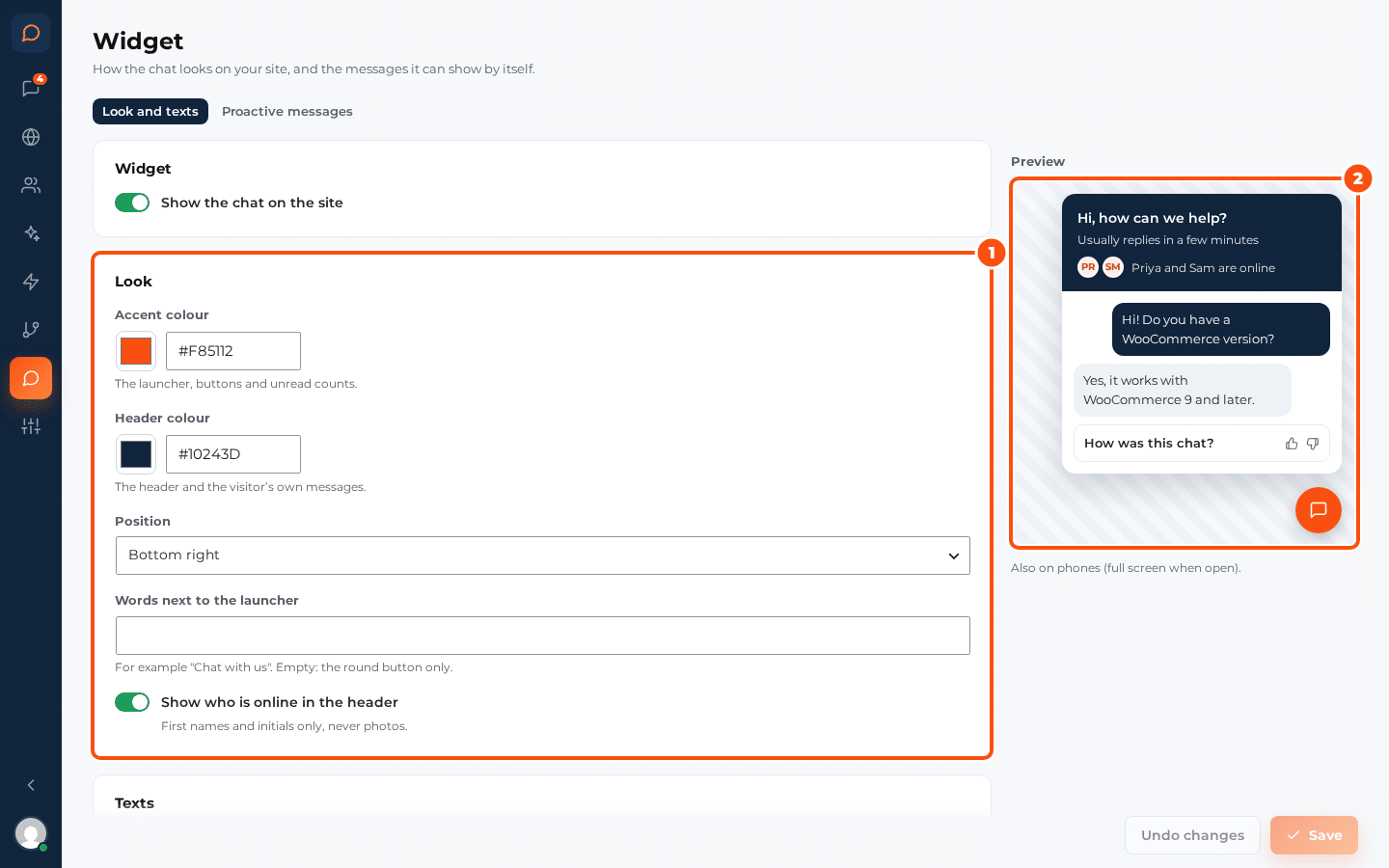
Look
| Setting | What it does |
|---|---|
| Accent colour | The launcher, buttons and unread counts |
| Header colour | The header and the visitor’s own messages |
| Position | Bottom right or bottom left |
| Words next to the launcher | For example “Chat with us”. Empty: the round button only |
| Show who is online in the header | First names and initials of the operators online, never photos |
Texts
| Setting | Default |
|---|---|
| Greeting | Hi, how can we help? |
| Reply time line | Usually replies in a few minutes |
| When nobody is online | We’re away right now. Leave your email and we’ll reply there. |
When the AI Chatbot answers first, the header says “Our AI assistant can help right now”.
Where it shows
- Show the chat on the site: switch the widget off everywhere without deactivating the plugin.
- Show the chat on phones: on a phone the chat opens full screen.
- Hide on these pages: one address part per line, for example
/checkout/or/wp-login.php. Any page whose address contains one of them has no chat.
Developers can hide the widget on more pages with the silc_show_widget filter.
What the visitor sees
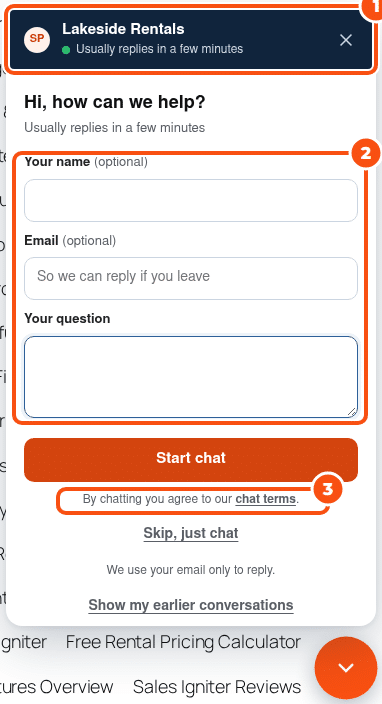
- Questions before the chat: the name and the email (each off, optional or required) and, if you like, “What is it about?”. Logged-in WordPress users skip them, and Let visitors skip and just chat adds a “Skip, just chat” link. They are set on Routing and hours, under Questions before the chat; by default the email is optional but required when nobody is online, so the reply can go by email.
- The chat terms line: “By chatting you agree to our chat terms”, which opens your chat terms. See Privacy, consent and GDPR.
- Files: after the first message the visitor can attach images, PDF, text, CSV, ZIP, Word and Excel files.
- Earlier conversations: “Show my earlier conversations” asks for an email address and sends a 6-digit code, so a visitor on a new device or browser can pick up their earlier chats. Logged-in visitors see it too, until they have proven their email with a code.
- Bring your earlier chats here: when a visitor types an email in the chat (to start it, or when the chat asks for one), the chat offers “Chatted with us before? We can email you a code to bring your earlier chats here.” Email me a code sends the code (it lasts 10 minutes and allows 5 tries), and typing it in the chat shows that browser the earlier chats with that address. Not now hides the offer for the rest of the visit. The offer shows for every address the browser hasn’t proven yet, so it never tells anyone whether an address has chatted before. A typed email on its own never shows anyone another person’s chats.
- Unread replies: the launcher shows a count, and an unread reply follows the visitor to the next page.
- Answers from the AI show the help docs they came from and a Talk to a person button. See The AI Chatbot.
- A rating when the chat is resolved, if you ask for one. See Routing, office hours and ratings.
The widget works with the keyboard and screen readers. It is checked with axe against WCAG 2 A and AA, closed and open, at desktop and phone width, and it draws itself in its own Shadow DOM, so your theme’s CSS does not change it.